
Competitive Edge Toolkit
$14/Month
Take Advantage of SEO Opportunities Your Competitors Missed
The Competitive Edge toolkit provides 3 tools for understanding your unique competitive landscape on Google to make better SEO decisions that cut into your competitor’s advantages. As a small business owner or solopreneur, you likely already know who your toughest competitors are, but do you know who Google considers them to be? With this toolkit, you can see the specific keywords they rank for (and you don’t), and discover which of their pages are actually driving traffic. Competitive Edge offers a transparent look into what’s working for your competitors so you can determine strategic steps for becoming more competitive on Google.
Tool #1
Competitor Finder
Find out who you’re really competing against for keyword rankings
Those you think of as competitors are not always the same ones that Google has understood your competition to be. For example, a local body shop may assume their biggest competitor in search is a popular collision center across town that runs TV ads. But in search results, they’re actually competing against a mom-and-pop shop for more of the same keywords because they offer nearly all the same repair services. The Competitor Finder tool cross-references your website’s keyword rankings against those of your competitors to find who is competing for the exact same keywords you are.
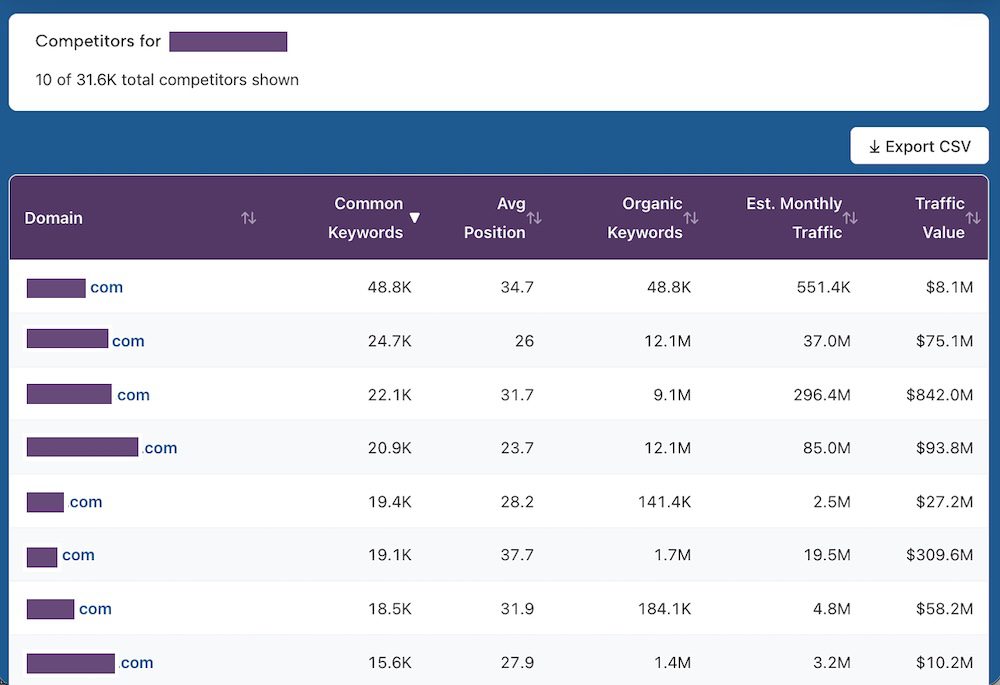
Data generated by this tool
Simply enter your domain and the Competitor Finder tool will identify the top 10 websites competing for the same keywords. You’ll receive the following data for each listed competitor:
- Domain name
- # of common keywords you both rank for
- Average position of those common keywords
- # of total ranking keywords for the domain
- Estimated monthly traffic
- Estimated traffic value, based on cost-per-click values
And for every listed competitor, you’ll have the option to perform a keyword gap analysis by simply clicking “Gap.” That will push you to another tool in this toolkit, Keyword Gap, and automatically run an analysis between the competitor’s domain and your own.
Usage details & limits on the Competitor Finder tool
- Up to 100 total checks per month
- Clicking on the “Gap” option for a competitor’s domain will count as one check for the Keyword Gap tool
- Usage limits reset at the start of each monthly billing cycle
- Desktop use only (mobile features coming soon)
- Website results are cached for 24 hours
- U.S. – based customers only
- Exportable results via CSV
- Website ownership NOT required for crawling – analyze any site live on the internet
Keyword Gap
Identify keywords your competitors rank for that you don’t
This is where competitor analysis turns into a SEO content plan. The Keyword Gap tool compares your website against any competitor to find two critical pieces of data:
- Keywords you both rank for (shared keywords)
- Keywords they rank for but you don’t (keyword gap)
The tool lists the top 250 keywords in the “shared” category, and the top 250 keywords in the “gap” category. Branded keywords (ex: company name) are automatically excluded to ensure this data is as useful as possible to your SEO content strategy.
Each listed keyword is an opportunity because it shows different ways that your target audience is finding similar services with a competitor. It also demonstrates how closely your two websites may be targeting certain keywords, which can be useful for informing future content/optimization strategies.
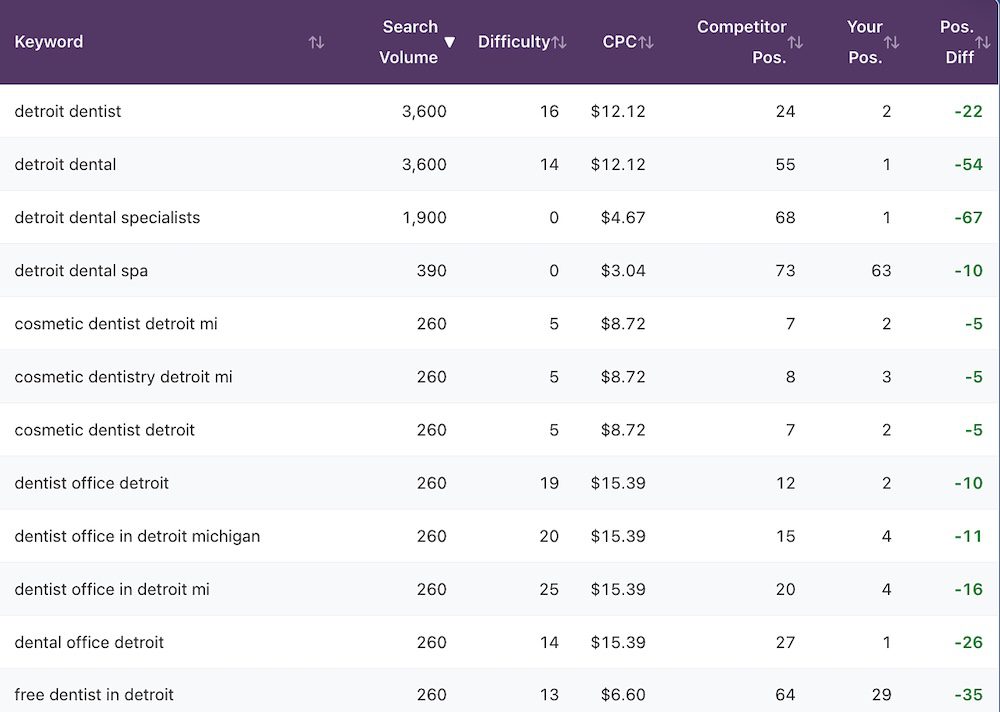
SEO data generated by this tool
The Keyword Gap tool has two tabs that feature up to 250 keywords each with their respective data: Keyword Gaps and Shared Keywords. For each keyword, you’ll see:
- Monthly search volume
- Keyword difficulty
- Cost-per-click
- The competitor’s ranking position
- Your ranking position
- Total difference in ranking position (ex: If they rank #3 and you rank #8 for a keyword, the difference is +5)
Result tables are sortable by any of the above metrics to narrow down exactly what you need. Instead of simply brainstorming what to write about next, you’ll be working from a list of keywords that are already driving traffic to a competitor in your space.

Usage details & limits on the Keyword Gap tool
- Up to 60 total checks per month
- Each tab (Keyword Gaps and Shared Keywords) feature up to 250 keywords each, for a total limit of 500 keywords per check
- Usage limits reset at the start of each monthly billing cycle
- Desktop use only (mobile features coming soon)
- Website results are cached for 24 hours
- U.S. – based customers only
- Exportable results via CSV
- Website ownership NOT required for crawling – analyze any site live on the internet
Top Pages Analyzer
See which of your competitors’ pages actually drive traffic
A competitor might have a hundred pages on their website, but only a handful are doing the heavy lifting on producing clicks from Google. The Top Pages Analyzer tool shows you the specific pages that bring in the most organic traffic to their website. Rather than simply browning a competitor’s website and making educated guesses, this data tells you more about what’s actually working to attract their audience to the site.
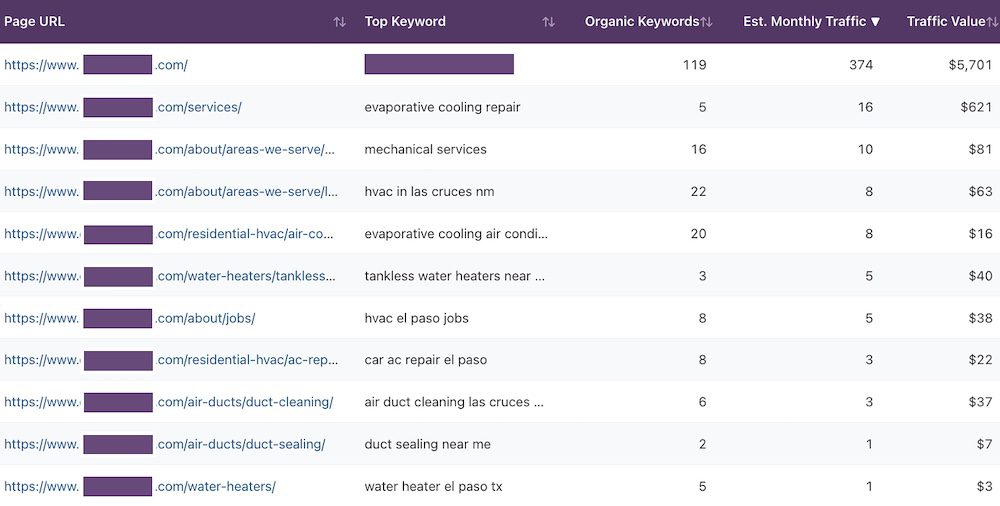
SEO data generated by this tool
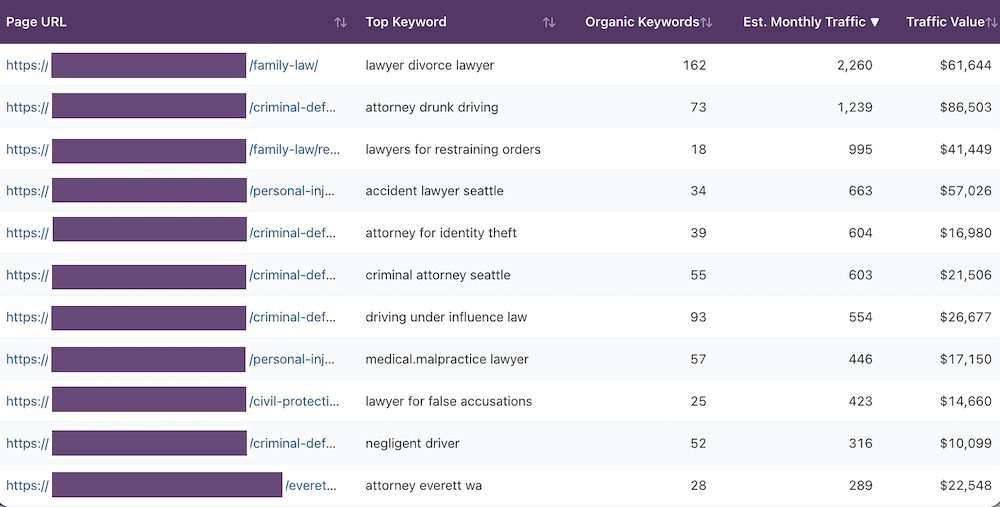
Top Pages Analyzer shows you the top 250 highest-traffic pages for any entered domain. For each page listed in the tool’s results, you’ll see:
- Page URL
- Its top keyword (this is the keyword that brings in the most organic traffic for that page)
- Total number of ranking keywords for the page
- Total estimated monthly traffic for the page
- Total traffic value for page, based on cost-per-click / Google Ads values
With this data, you’ll get a clear picture of what content is actually working for your competitors, not just what they’ve published. For example, if a handful of blogs account for half of their organic traffic, it’s worth investigating whether your site could produce similar articles. This is competitive intelligence that translates directly into making different decisions for your own site.
Usage details & limits on the Top Pages Analyzer tool
- Up to 60 total checks per month
- Up to 250 pages will be listed per check
- Not every page will get listed – if a URL has no rankings or traffic, it will be skipped
- Usage limits reset at the start of each monthly billing cycle
- Desktop use only (mobile features coming soon)
- Website results are cached for 24 hours
- U.S. – based customers only
- Exportable results via CSV
- Website ownership NOT required for crawling – analyze any site live on the internet
Want Keyword Research Data & Website Auditing Too?
If you’d like access to in-depth keyword research, technical SEO audits on your site, on-page optimization analysis and more, the SMB SEO Toolkit has got you covered. For a bundled price of $32/month (14% off), you’ll get all 9 SEO tools from our individual toolkits: DIY Website Audit, Keyword Intelligence and Competitive Edge.
Subscribe
Order your toolkit subscription and get immediate access to all 3 tools: Competitor Finder, Keyword Gap and Top Pages Analyzer.
Instant Access
Log in from any desktop browser. No software to download, nothing to install or configure. Your tools are ready the moment you subscribe.
Usage Details
100 checks/scans per month for the Competitor Finder tool. 60 checks/scans per month for the Keyword Gap and Top Pages Analyzer tools each. Usage limits reset at the start of each monthly billing cycle.
Cancellation Policy
Cancel a subscription from your account page whenever you want. You’ll keep access through the end of your current billing period.
Frequently Asked Questions
Will competitors know I’m snooping on their SEO performances?
No, the Competitive Edge toolkit uses third-party search data to determine how domains perform in Google’s results. There are no notifications sent, and no access requests to their accounts or analytics. It’s the same publicly available search data that any SEO professional can access – you’re just getting it in a format that’s easy to use.
Aren’t my search competitors the same as my IRL competitors?
There’s typically some overlap, but you may be surprised at how different these groups can be. Your IRL competitors can compete in all types of mediums, such as word of mouth, mail-in ads and billboards. Your search competitors are limited to Google and other search engines. For instance, a local accountant might compete for walk-in clients with the firm down the street, but in search results they’re also competing with an accounting firm on the other side of town, TurboTax and NerdWallet.
Is there a clear process in how I should use these tools together?
You’re welcome to jump into the toolkit however you see fit, but if you’re not sure where to begin, here’s a recommended process to get started with: First, enter your domain into the Competitor Finder to see the top 10 domains that are competing for the same keywords. From there, you can see precisely which keywords you’re competing for against each domain with the Keyword Gap. Then it’s onto the Top Pages Analyzer to determine their most successful pages and cross reference that with the keyword data you’ve collected to ensure all your bases are covered.
Are these tools just for analyzing direct competitors?
No, you have the ability to enter the domain of any website live on the internet. Some users analyze businesses in other cities to see what content strategies seem to be working for them. Others will look at larger companies in their industry to understand which topics drive the most traffic at scale, then adapt those ideas for their local market.
What should I do with keyword gap data?
Each keyword your competitor ranks for that you don’t is a content opportunity. The most practical approach is to find the keywords with difficulty scores under 40 and look at their corresponding volumes. Keywords with lower difficulty and higher traffic are the best to target with a new blog, service page or content section on an existing page. You’ll be building a SEO content plan based on proven demand rather than guesswork because these keywords are already driving traffic to someone in your market.
Does this toolkit work well with the other toolkits?
Yes, Competitive Edge is designed to fit well with the other toolkits, each of which contain 3 total tools. Keyword Intelligence lets you research keywords more deeply and look up ones that are not tied to a specific domain. And the DIY Website Audit toolkit identifies what’s broken or unoptimized on the site so you can address hidden SEO issues that harm rankability on Google. If you’d like to harness the full workflow that these 9 total tools offer, consider the SMB SEO toolkit, which provides access to all these tools for a bundled price.
A Complete View of Your Competition in Organic Search
These tools will show you what your competition is doing in the SEO space so you can close the ranking gaps. Subscribe to the Competitive Edge toolkit for $14/month to see the keywords they’re ranking for, the content that’s driving their search traffic and more.
Looking for more SEO insights beyond what this toolkit provides? The SMB SEO Toolkit gives you access to all 9 tools from our 3 individual toolkits for a bundled price of $32/month.