
Keyword Intelligence Toolkit
$14/Month
Analyze SEO data for any keyword & measure your site’s search rankings
The Keyword Intelligence toolkit gives you 3 tools to take the guesswork out of your SEO content strategy. Without the necessary data, it’s up to small business owners, freelancers and solopreneurs to make educated guesses on their target audience’s search behaviors. Do you know exactly which keywords they use to find your website? Going a step further, do you know the search volumes of those terms, or how difficult they are to rank for? Keyword Intelligence lets you figure out which keywords are worth targeting, have a clear picture of your current rankings, and see exactly who you’d be competing against in the SERPs for a specific term.
Tool #1
Keyword Research
Data that tells you which keywords are worth going after
Creating website content requires an investment into effort and resources. Writing a new article, building a service page or optimizing an existing page have tangible costs to them, so it’s worth having the data to know if this work will produce the ROI you expect. If you’re targeting keywords that people don’t actually search for, or are impossibly competitive, that investment won’t pay off. The Keyword Research tool is designed to give you the necessary data to make that choice before you commit to making content changes.
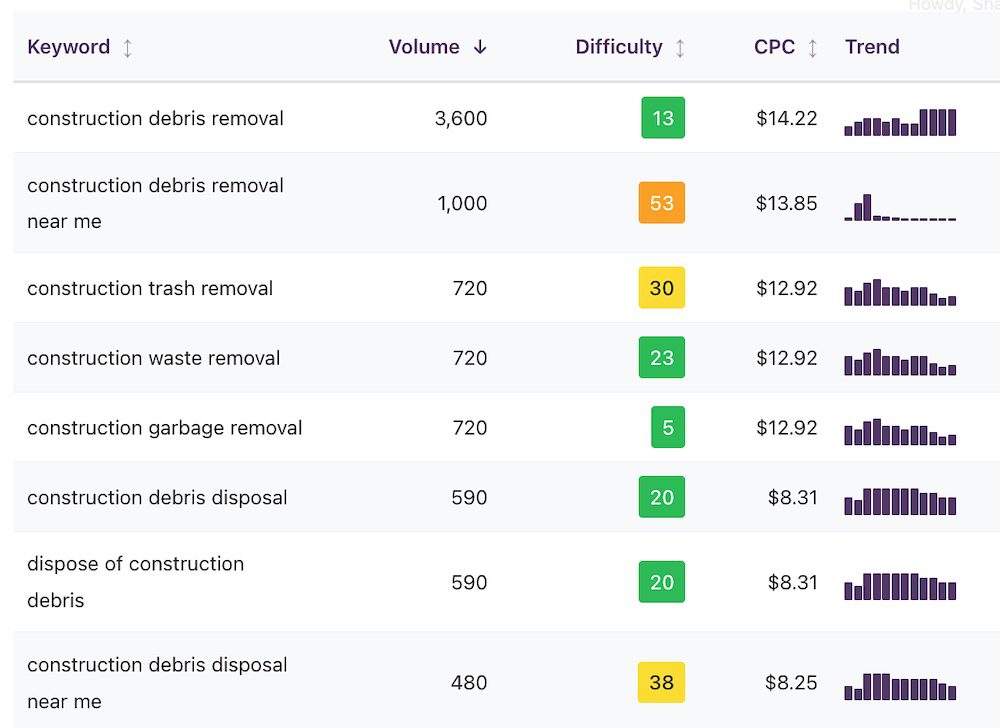
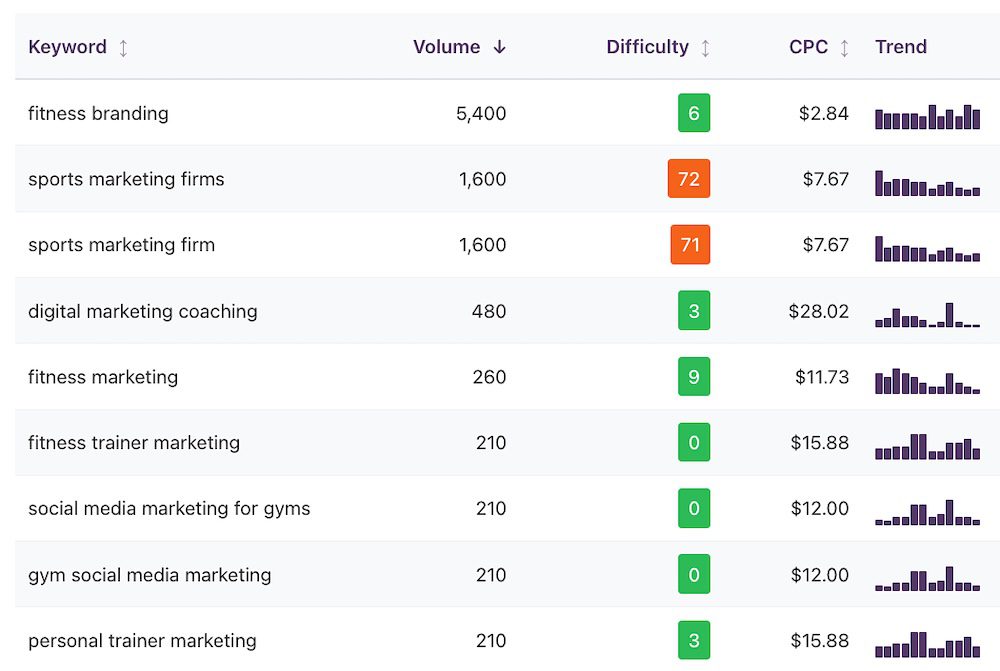
Keyword data generated by this tool
In a single batch, you can enter up to 250 keywords at a time and analyze the following data points for each term:
- Monthly search volume – estimate of how many times this keyword is searched on Google each month
- Keyword difficulty – a 0-100 score showing how hard it is to rank on page 1 for this term
- Cost-per-click – what PPC advertisers pay for this keyword, which tells you how commercially valuable it may be
- Trend data – a visual look at the search popularity of this term over the past 12 months to see whether interest is growing, declining or staying flat
The Keyword Research tool provides a sortable, filterable results table that you can organize by volume, difficulty or cost-per-click. It also allows you to export all this data as a CSV file to share with your team or keep for future content planning.
Usage details & limits on the Keyword Research tool
- Up to 250 batched keywords per check, with 100 total checks per month
- Usage limits reset at the start of each monthly billing cycle
- Desktop use only (mobile features coming soon)
- Website results are cached for 24 hours
- U.S. – based customers only
- Exportable results via CSV
- Website ownership NOT required for crawling – analyze any site live on the internet
Keyword Rank Checker
Analyze current Google rankings and find opportunities to grow
Your website may already rank for many keywords you aren’t aware of. Some of those rankings will be on Page 2 or 3 of Google’s search results – close enough that small improvements in the existing content could move them to where the real traffic is on page 1. The Keyword Rank Checker tool features the data you need to get started: what you rank for, which pages contain those rankings and which keywords are worth pushing harder in your content.

Keyword data generated by this tool
The Keyword Rank Checker provides actionable data for the top 1,000 keywords a domain ranks for. For each ranking keyword, you’ll determine its:
- Current position on Google
- Estimated monthly search volume
- Keyword difficulty
- Cost-per-click
- Page that holds that ranking
Similarly to the Keyword Research tool, you’ll receive a sortable, filterable table that can be organized by position, volume, difficulty, cost-per-click and ranking page. With this data, you can find the unique ranking opportunities that are hiding in your website’s keywords. Sort to find terms in positions 11 – 30 for chasing those quick wins or take a fine-tooth comb to determine which page 1 rankings are worth working on to elevate them into positions #1 – #3.

Usage details & limits on the Keyword Rank Checker tool
- Up to 60 total checks per month
- One single check analyzes up to 1,000 of the site’s keywords
- These top 1,000 keywords are determined by their current position, starting with #1
- Usage limits reset at the start of each monthly billing cycle
- Desktop use only (mobile features coming soon)
- Website results are cached for 24 hours
- U.S. – based customers only
- Exportable results via CSV
- Website ownership NOT required for crawling – analyze any site live on the internet
SERP Overview
Know who’s ranking for any keyword before jumping in
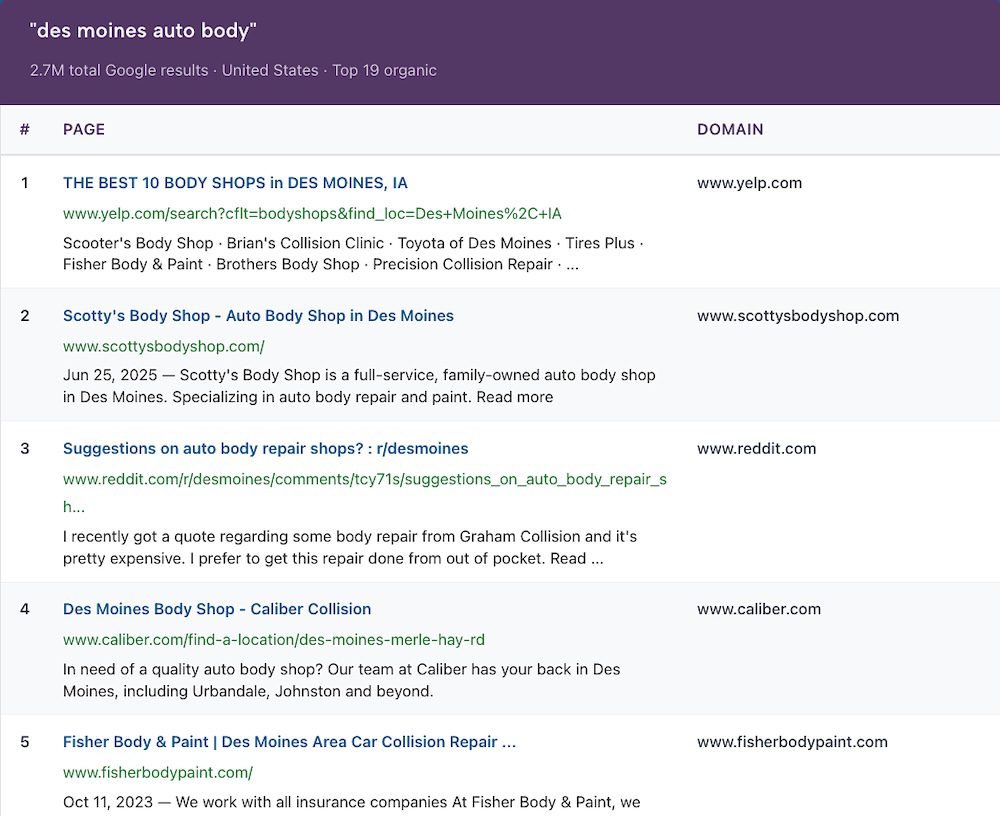
A keyword might have great search volume and a reasonable difficulty score, but it’s also important to know what other websites are ranking in Google’s search engine result pages (SERPs). The SERP Overview tool shows you the top 20 organic results of any keyword so you can make a more informed decision about whether it’s worth going after. Plus, you can open up keyword data even further to analyze its top 100 results and highlight a specific domain to see if it ranks in the first 10 pages of Google.
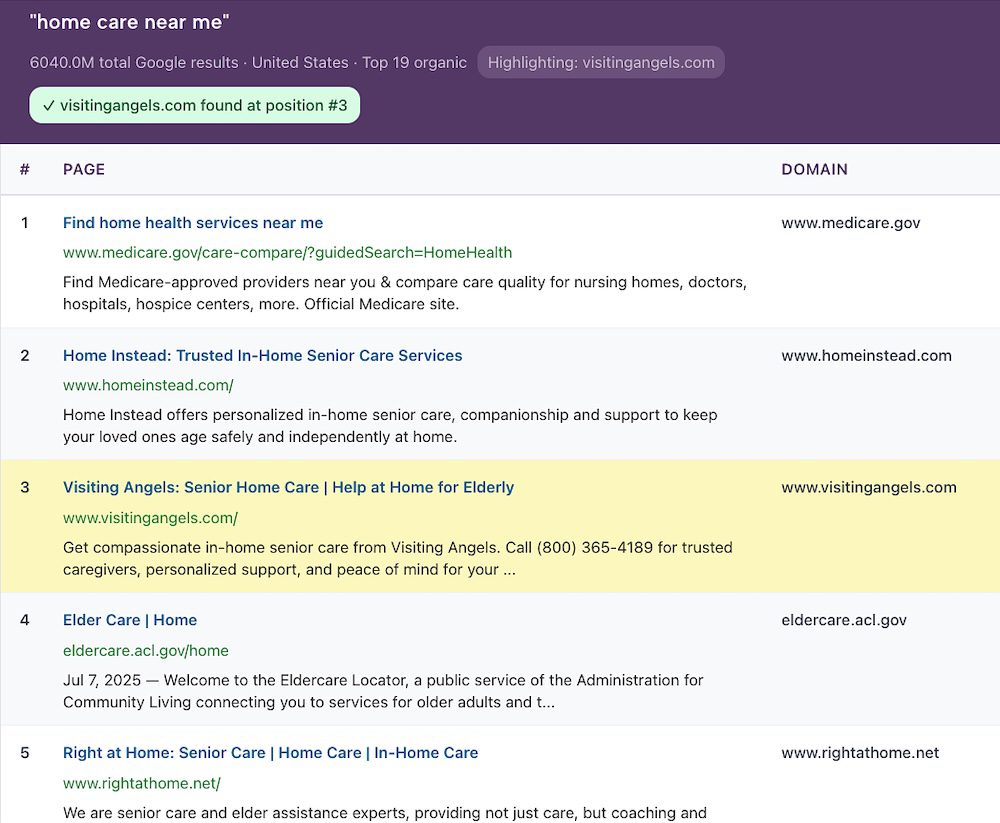
SEO data generated by this tool
With the SERP Overview tool, you can check who’s ranking best for any keyword and enter an optional domain to see if it appears on the first two pages of Google’s search results. If it does rank in the top 20 results, that domain will be highlighted in the table. And if you’re not satisfied with just the first two pages of SERPs, you can search again for the keyword’s top 100 results and see if the optional domain is highlighted further down in Google’s index.
For each result highlighted in your table, you’ll see the following data, organized by ranking position:
- Page URL
- Title tag
- Meta description
- Website domain
This information can be helpful in determining the types of websites that Google prefers to rank for a keyword. For example, if the first few pages of results are all major brands and corporations, you’ll probably want to target a keyword that’s more attainable for your website’s reach. But if you see smaller websites similar to yours ranking for a keyword, that’s a sign that there’s potentially room for you in the SERPs too.
Usage details & limits on the SERP Overview tool
- Up to 100 total domain checks per month
- For each check, you’ll see the top 20 results for each keyword
- You can expand a check to see the top 100 results for any keyword, but that will count as a new check against your monthly usage
- Usage limits reset at the start of each monthly billing cycle
- Desktop use only (mobile features coming soon)
- Website results are cached for 24 hours
- U.S. – based customers only
- Exportable results via CSV
- Website ownership NOT required for crawling – analyze any site live on the internet
Want Website Auditing & Competitor Insights Too?
If you’d like access to in-depth website audits, on-page optimization insights, competitor analysis, keyword gaps and more, the SMB SEO Toolkit has got you covered. For a bundled price of $32/month (14% off), you’ll get all 9 SEO tools from our individual toolkits: DIY Website Audit, Keyword Intelligence and Competitive Edge.
Subscribe
Order your toolkit subscription and get immediate access to all 3 tools: Keyword Research, Keyword Rank Checker and SERP Overview.
Instant Access
Log in from any desktop browser. No software to download, nothing to install or configure. Your tools are ready the moment you subscribe.
Usage Details
100 checks/scans per month for the Keyword Research and SERP Overview tools. 60 checks/scans per month for the Keyword Rank Checker. Usage limits reset at the start of each monthly billing cycle.
Cancellation Policy
Cancel a subscription from your account page whenever you want. You’ll keep access through the end of your current billing period.
Frequently Asked Questions
Does the Keyword Intelligence toolkit pull data from a specific location?
Yes, these tools pull SEO keyword data from the United States by default. To look up market-specific keywords, make sure to include it in the query itself (ex: “seattle dentist” or “family law firm in el paso”).
What’s the difference between Keyword Research and Keyword Rank Checker?
While these tools both analyze keyword data, they start from opposite directions. Keyword Research starts with keywords that you manually input – these have no bearing on whether your website ranks for them or not. Keyword Rank Checker starts with a website and pulls only the keywords that it currently ranks for. The first tool helps you find new ranking opportunities that do not exist on your website at the present moment. The second tool helps you find existing ranking opportunities that can be improved upon for your website.
Why are some similar keywords showing the same data?
These tools rely on a popular SEO data provider that’s used by millions of agencies and marketing professionals worldwide. When parsing highly similar keywords (ex: “business coach in san francisco” vs “san francisco business coach”), it will group these terms together and display identical volume, difficulty and CPC data. Please note that this data is powered by thousands of data points to produce highly accurate estimates, but they are estimates nonetheless.
Can I check which keywords a competitor ranks for as well?
Yes, all 3 tools in the Keyword Intelligence toolkit will work on websites that are accessible on the internet, not just your own. You can easily use these tools to analyze competitor websites and see what’s working for their SEO.
What does keyword difficulty mean?
Keyword difficulty is a score from 0 to 100 that estimates how hard it would be to rank on Google’s first page for a given keyword. It is not an official metric from Google, but it’s determined by virtually all 3rd-party keyword tools to help users understand how competitive the term actually is. Lower scores mean less competition. As a general rule, keywords under 30 are considered easy, 30-50 are medium, and above 50 are hard. For websites that struggle to rank in search, it’s recommended to focus on keywords with difficulties between 0 – 20 and expand from there.
What are “quick wins” in SEO and how do I find them?
Quick wins, also known as low-hanging fruit opportunities, are keywords that your site ranks for in a reasonable position. Typically in SEO, we say rankings between positions #2 – #30 are solid targets for a quick-win strategy. You’re close enough that purposeful improvements to the ranking page (expanded content, more internal links, etc) could push that keyword into a higher position that attracts more traffic from Google. To find these wins, look for keywords in positions #2 – #30 with manageable difficulty (0 – 40) and a volume of at least 10 clicks per month.
Get the Full Picture of Your Keyword Landscape in Search
Many small businesses and solopreneurs create content without knowing exactly how their audience is searching online. Subscribe to the Keyword Intelligence toolkit for $14/month and see the critical SEO data you need to effectively optimize your website content.
Looking for more SEO insights beyond what this toolkit provides? The SMB SEO Toolkit gives you access to all 9 tools from our 3 individual toolkits for a bundled price of $32/month.